Monitoring
Technology areas
Monitor entire technology landscapes with keywords and IPC/CPC codes, and let PatentSecure tag every match by area.
Open in PatentSecure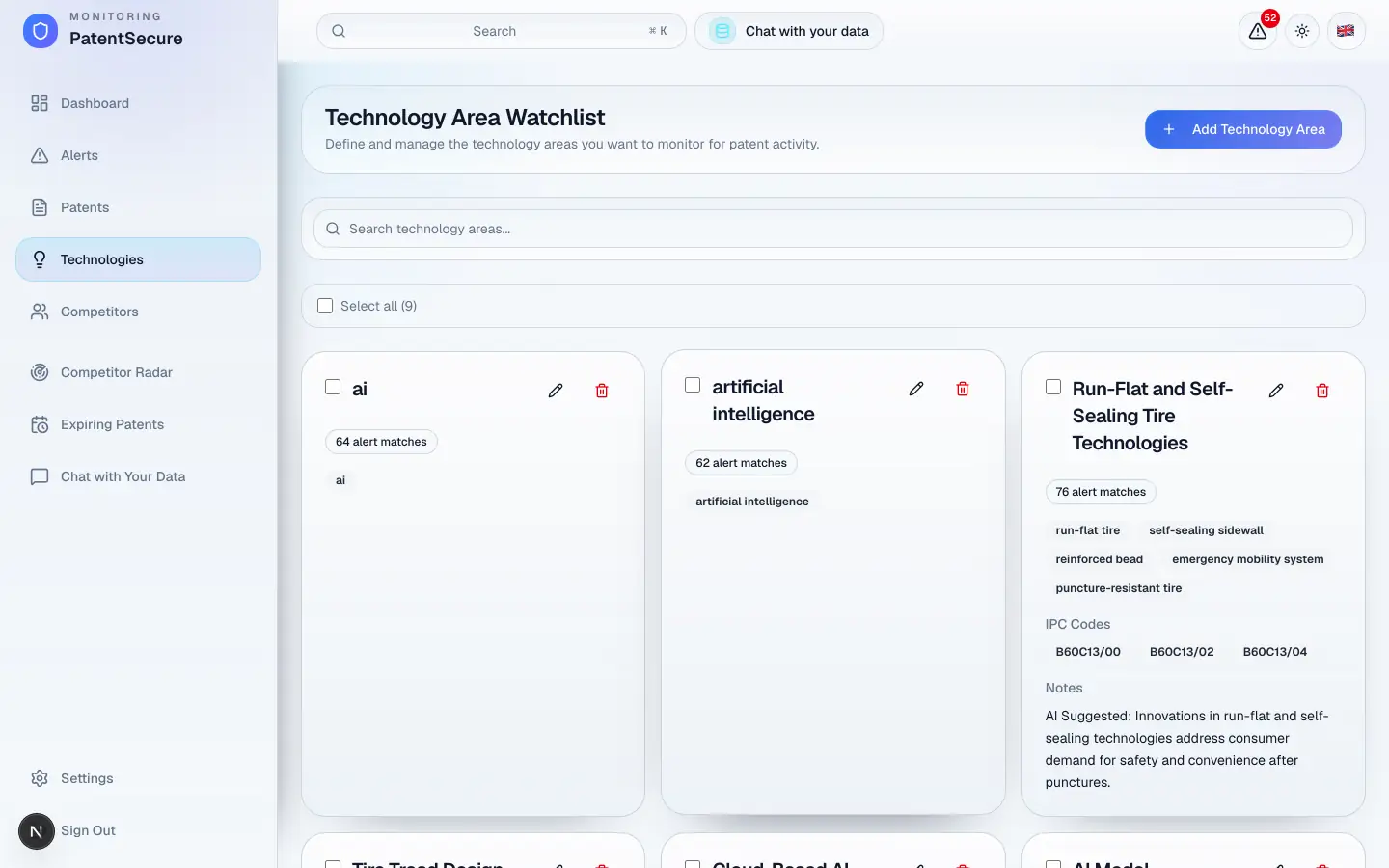
A technology area is a slice of technology you want to watch — for example “solid-state batteries” or “autonomous lane-keeping.” You define it once with keywords and patent classification codes, and PatentSecure then checks every new patent against it during the daily scan. Any matches are automatically tagged with that area, so your findings stay organized.
Why use technology areas
Technology areas let you monitor a whole landscape, not just a single company. They're how you keep watch on the fields that matter to your business — to spot threats early and follow where innovation is heading. Each area keeps its own list of matches, so you can triage by topic.
How to add a technology area
- In the left menu, open Technologies.
- Select Add to create a new area.
- Give the area a clear name (for example, Smart Grid Management).
- Add keywords that describe the technology in plain words (for example, distributed energy, load balancing, demand response).
- Optionally add IPC or CPC codes — the standard patent classification codes — to make matching more precise (for example, H02J 3/00). If you don't know the codes, keywords alone work well.
- Save the area.
What happens after you add one
From the next daily scan onward, PatentSecure compares every new patent against your area using both the keywords and the AI's understanding of the technology — not just exact word matches. Relevant patents appear in your Alerts, each tagged with the area that matched, so you always know why a patent was flagged.
Tip: Start broad, then refine. If an area surfaces too many loosely related patents, tighten it with more specific keywords or add classification codes. If it surfaces too few, broaden the keywords.
Keeping areas tidy
You can maintain a separate area for each strategic topic. Well-named areas make your alerts much easier to scan, because every finding is grouped by the area it belongs to.
Plan limits
Your subscription sets how many technology areas you can monitor at once. You can see your current usage in Settings → Subscription & Billing, and adjust your areas at any time.
PatentSecure provides decision support for your IP management and does not replace individual legal advice.
Ready to protect your innovation?
See PatentSecure on your own portfolio in a personal demo.
Contact sales